


Confide: A Free App to Keep your Business Secrets from Getting Hacked

These past few days, the news of a huge entertainment company being hacked shocked most of us. This big company is no other than Sony Pictures. A hacker group called LulzSec sent out a message on Twitter saying: “1,000,000+ unencrypted users, unencrypted admin accounts, government and military passwords saved in plaintext. #PSN compromised. @Sony”.

Image Credits: TRF_Mr_Hyde via Flickr

Image Credits: TRF_Mr_Hyde via Flickr

Various collections of data were accessed and stolen easily without the need of outside monetary support. Among these data are admin details including their passwords. Truly, it is very scary.

This is not the first time Sony has been hacked. In 2011, hackers stole the personal information of over 24.6 million Sony Online Entertainment users with more than 20,000 credit card information. This is such an embarrassment for a company as big as Sony.

This “simple” attack by LulzSec will surely make Sony paranoid to the extent of further improving their technological restrictions, security, and privacy. Luckily for Sony, a private messaging company offered their services to them for free.

Confide, a relatively new private messaging App for Android and iPhone, mimics the capabilities of Snapchat. The only difference is that, Confide does not let the people you send messages to take a screenshot. It’s a way to send messages to your contacts without having to worry about the information getting hacked or leaked out.
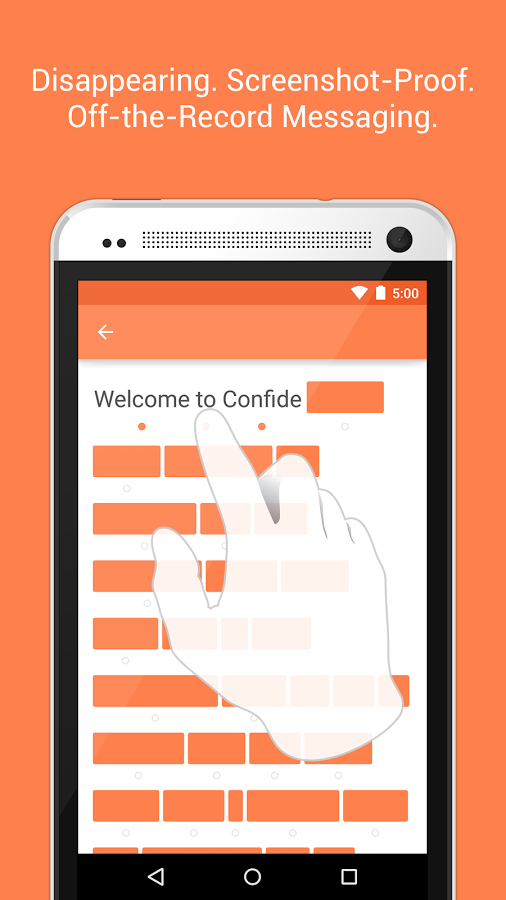
Screenshot Credits: Confide App via Google Play Store

Screenshot Credits: Confide App via Google Play Store

Other features of the Confide App include: messages disappearing forever once they have been read, messages being encrypted, messages can be sent to email addresses or phone numbers, and getting notifications once your message has been read.

Best of all? It can be downloaded for FREE in Google Play or ITunes.

Along with Sony, Confide App is now trying to capitalize on the Sony hack by pitching its services to other big companies. If you asked me, I would say that perhaps Confide App has an association with the recent hack in order to market their business, but that is just my crazy conspiracy theory talking.

Image Credits: michael davis-burchat via Flickr

Image Credits: michael davis-burchat via Flickr

The main agenda of the hackers was to warn the nation of how “simple” it could be to access information with security flaws, and how it is paramount to tighten privacy measures in this age and time.


Read More...

Be a Smart Consumer: Avoid These 4 Marketing Tricks

To be a smart consumer, you must spend within your needs and not over your means. Marketing or Sales Agents like any other businesses are using the power of persuasion to gain profit. I’m not saying it is a bad thing (personally I think it is a talent), but it may influence the consumers to buy something that is rather unnecessary.

Image Credits: Andrew Stawarz via Flickr

Image Credits: Andrew Stawarz via Flickr

On that note, here are 4 Marketing Tricks you shall learn to avoid…

1. Foot-in-the-Door

It is a technique that starts with small requests in order to gain a “YES” with bigger requests. This works because of our desire to be consistent in our commitments.

For example, Fitness Studios will make you test their services first by giving a 1-week free pass before offering you their packages. Do you really need a $1,800 worth of Gym Membership when you rarely have the time to go?

2. Door-in-the-Face

In contrast, this trick starts with a huge and unreasonable request in order for you to settle with a smaller request.

For example, your friend asks you to donate $100 to a charity institution and you declined. Your friend will then say: “can you at least donate $10”. And, you will agree and comply. The truth is, your friend only intends for you to donate $10.

3. Low-Balling

Technique to purposely offer a product at a lower price than one intends to charge. This tactic will make you buy something at an affordable price before revealing the hidden costs (i.e., insurance, the phone casing, or batteries).

Image Credits: JOHN LLOYD via Flickr

Image Credits: JOHN LLOYD via Flickr

For example, a Car Salesman offers you an initial attractive offer that you can’t resist but then later increases the price because of a “mistake in labeling”. Once again, Psychology dictates that it works because of our need to be consistent in our choices.

4. Brainwashed by Advertising

There you have it! As Warren Buffett once said: “Rule No. 1: Never lose money. Rule No. 2: Never forget rule No. 1”. I hope that by knowing these, you will be able to make smarter consumer choices in the future.

Read More...

5 Ways to Shop for Healthy Foods Without Spending Too Much

It is no secret that buying organic and healthy foods is more costly than buying junk. But, if you are willing to shop smartly, then you can enjoy the goodness and freshness of organic foods without breaking your food budget. Here are 5 Ways to Shop for Healthy Foods Without Spending Too Much…

1. Purchase Within Your Family’s Needs

Buy stocks of food to fit your whole family. Usually, to save more money, you will want to buy in bulk, but, not if you are a family of three or two. Rethink your family’s needs and list it down.

2. Shop Around

In order for you to find the best price in town, you must shop around different stores. Besides supermarkets, you can search for healthy foods in specialty stores, Gourmet Delis, Wet and Dry Markets, and even Online. For instance, you may go to two different stores to save money and buy the best product: one for the vegetables and one for the sea foods.

Image Credits: epSos .de via Flickr

Image Credits: epSos .de via Flickr

3. Shop in Season

You will definitely save more money if you purchase the organic produce that is in season. Price always lowers when there is greater supply. Summer and fall are usually the best times to go creative with your food choices.

4. Grow Your Own Food

Growing your own food is organic at its finest. If you do not have a backyard or an apartment balcony there are community gardens for you to plant your own seed. Aside from being domestic, you can also save more money if you buy produce of the local supermarket’s brand (e.g. Mixed Vegetables by FairPrice).

5. Go Gaga over Greens

Kale, arugula, and spinach are some of the most nutritious and affordable foods you will find in a grocery store. As the color of the vegetable gets darker, the more nutritious it is because of its antioxidants and beta-carotene. If possible, buy the leafy greens that are not pre-packed because they are cheaper.

Image Credits: Amazing Almonds via Flickr

Image Credits: Amazing Almonds via Flickr

BONUS TIP! Stay on the outside aisles of the grocery store because the further you go inside, the less healthy it becomes. That is all for now. Have fun shopping!

Read More...

5 Free Things You Can Enjoy at the Singapore Changi Airport

Living on an airport like Tom Hanks in the movie “Terminal” may sound impossible. You would need to be looking for places to eat, places to enjoy, and to rest.

In real life, being stuck in a transit really sucks especially if you checked-in early or the flight is delayed.

BUT…not if you find yourself stranded at the Singapore Changi Airport! This exquisitely designed airport has a few perks up its sleeves. I give you the 5 Free Things You Can Enjoy before boarding at the Singapore Changi Airport.

1. FREE WIFI

There are free WIFI services in all the three terminals of the airport. Just head to the Information Counter and present your passport, in return they will give you a WiFi username and password. Also, there are free candies in the counter while you wait.

Alternatively, you may enjoy the abundant and free Internet Kiosks located beside the TV Lounges and scattered through the three terminals (T). There are actually over 500 computers that you will never have to wait in line to use one!

2. VISIT THE FIVE GARDENS

If you have more than 3 hours to spare, take a stroll to the five indoor gardens. These are namely: Cactus Garden (Terminal 1), Orchid Garden (T2), Fern Garden (T2), Sunflower Garden (T2), and the Butterfly Gardens (T3).

Image Credits: Swaminathan via Flickr

Image Credits: Swaminathan via Flickr

While you are in there, enjoy the breath of fresh air, may your kids count the species of succulents and take colorful selfies that you can upload right away because of the Free WiFi!

3. FREE TOUR OF SINGAPORE 

If you are a tourist with more than 5 hours to spare, then grab this awesome opportunity. To register for any of the tours, just approach the staff with your passport and boarding pass at the Free Singapore Tours Registration Booth located in T2 and T3.

You can choose from the Heritage Tour or the City Lights Tour. For more information, visit: http://www.changiairport.com/at-changi/leisure-indulgences/free-singapore-tour.

Image Credits: Mac Qin via Flickr

Image Credits: Mac Qin via Flickr

4. FREE MOVIES

Being in the transit for six hours will give you enough time to catch 2-3 movies for free! The airport boasts their 24-hour cinemas that screen the Fox Movies Premium Channel at T2 and the latest movies of various genres at T3.

5. PLAY XBOX 360 AND PLAYSTATION 3

Entertainment Deck in T2 is the place where the children and child at heart can go wild! Get caught in an action game while playing with the XBOX 360, Playstation 3 consoles or LAN gaming. All this for free! Parents, you can chill in the Cafeteria located in the middle of the Entertainment Deck as your kids play.

Sources: Vietnam Centre and CheekieMonkie

The next time you get stuck in a transit…I certainly hope that it is in the amazing Singapore Changi Airport!

Read More...

4 Smartphone Mishaps that You Can Repair Yourself

Nowadays, almost everyone uses a hand phone or a digital device (e.g. tablet, laptop). And as these devices grow in popularity, its complexity, features and parts also increase.

When a hand phone or cell phone is broken during the 1990’s, people will probably self-repair it by the use of small screwdrivers or even a pair of tweezers. But, self-repairing a Smartphone is not possible now…or is it?

The truth is…there are some repairs you don’t have to pay someone for. I bring you the ultimate list of 4 Smartphone Mishaps that You Can Repair Yourself (and save money in the process)…drum roll please!

1. REVAMP THE CHARGING PORT

With continued use; your charger may not fit as well into the port as it did before. The simple way to fix it is to use a sharp toothpick to remove the lint and dirt from the port. Clean the rest of your phone by using cotton swab/ cotton buds/ cotton tips with drops of distilled water on it.

Image Credits: Yutaka Tsutano via Flickr

Image Credits: Yutaka Tsutano via Flickr

2. IMPROVE THE AUDIO QUALITY

Overtime, you may experience hearing an inferior sound when you plug the earphones into the “jack” (usually on the upper-right hand corner of the phone). To fix this audio quality, stick a cotton swab into the jack and use it to clear out any dirt.

3. REPLACE A SHATTERED SCREEN

Replacing your smartphone’s screen is usually do-able and it is easier than you think! All it takes is the right tools and a little courage. Get concise instructions online (here or here) and buy a repair kit if you don’t have a toolbox. You may buy a repair kit on IFIXIT or Ebay.

Image Credits: Toby Charlton-Taylor via Flickr

Image Credits: Toby Charlton-Taylor via Flickr

4. REVIVE A SOAKED SMARTPHONE

One of the common mishaps is water damage. Even I experienced it myself. So, if your phone takes an unexpected swim, remove the battery (if possible), and place it in a bag of rice for one day or two to absorb the moisture within. With luck, this will do the trick.

Image Credits: rharrison via Flickr

Image Credits: rharrison via Flickr

Sources: Reader’s Digest Magazine, Lifehacker.com

Spare yourself some money and time by subtracting Smartphone repair to your expenses! Truly, there are some mishaps that you can handle yourself. All it takes are tools, courage, determination, and a little help from the Internet.

Read More...