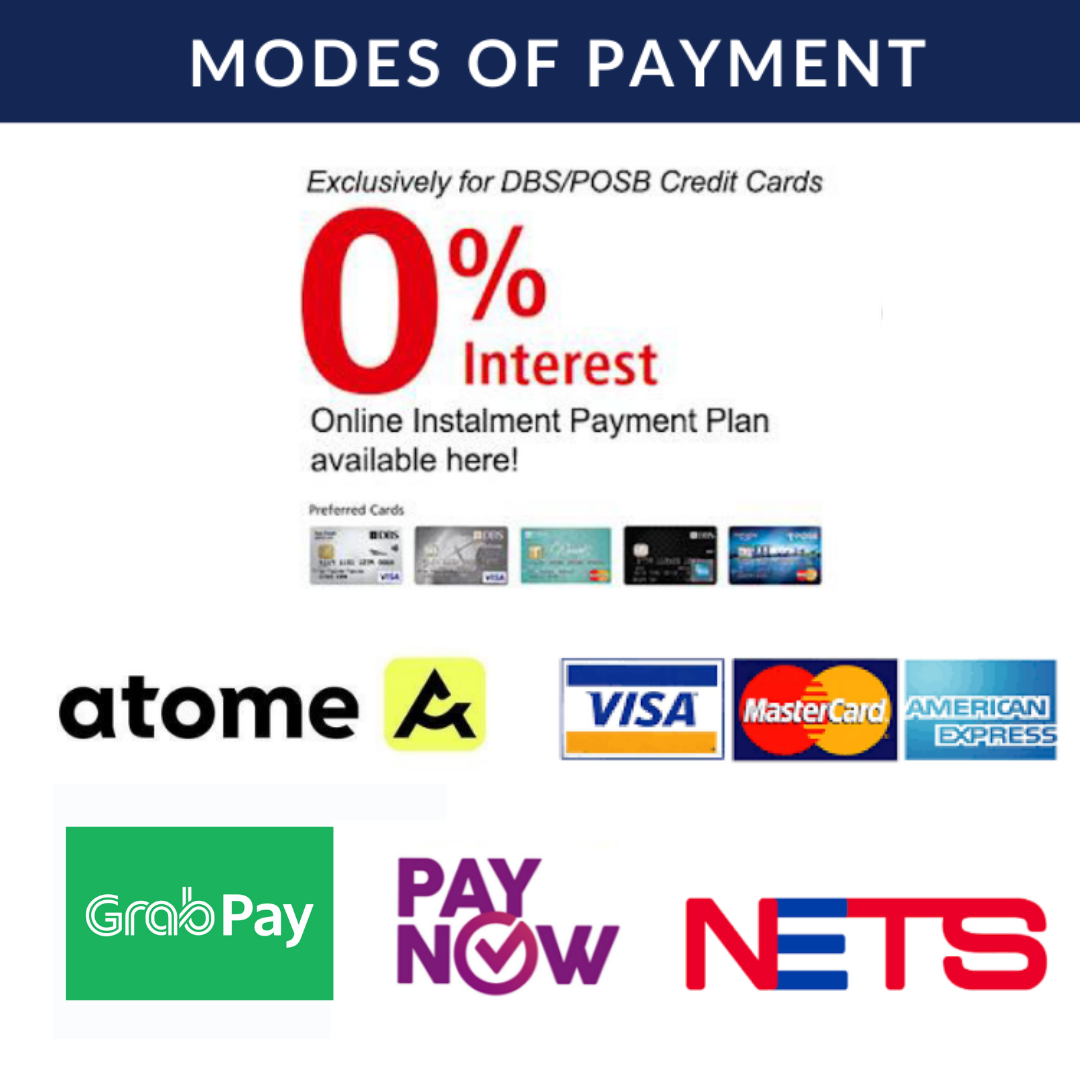
How to Add Subtitles and Closed Captions to Your Videos Using CapCut

Video content has become increasingly popular across various platforms. Whether you’re a content creator, a marketer, or simply someone who enjoys making videos, adding subtitles and closed captions to your videos can greatly enhance their accessibility and reach. CapCut, a free online video editor, offers a user-friendly interface and powerful features that make it easy to add subtitles and closed captions to your videos. In this article, we will provide you with a step-by-step guide on how to add subtitles and closed captions using CapCut.

Attributes of CapCut’s Subtitles and Closed Captions to Videos
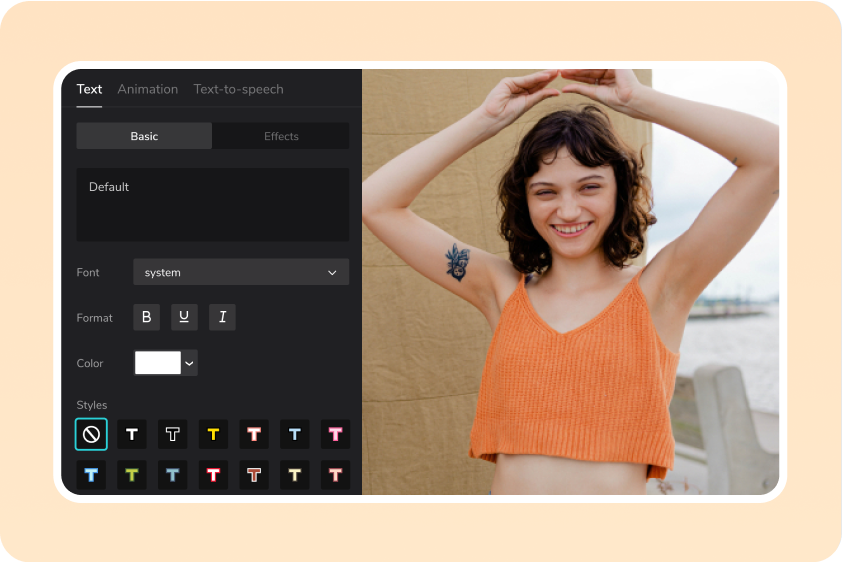
Source: CapCut

  • Accuracy: CapCut’s subtitles and closed captions strive to be highly accurate, faithfully representing the spoken content of the video. This ensures that viewers can rely on the captions to understand the dialogue and any other essential audio elements.
  • Synchronization: The subtitles and closed captions in CapCut are meticulously synchronized with the corresponding audio. They appear on the screen at the appropriate time, aligning with the speaker’s dialogue or relevant sounds, thus enabling a seamless viewing experience.
  • Readability: CapCut’s subtitles and closed captions prioritize readability. They employ clear and legible fonts, appropriate text size, and suitable color contrast against the background. This ensures that viewers can easily read the captions without straining their eyes.
  • Formatting: To aid comprehension, CapCut’s subtitles and closed captions utilize formatting features such as line breaks, speaker labels, and text positioning. Line breaks are strategically placed to prevent overcrowding and allow for smooth readability. Speaker labels help identify different speakers during conversations, enhancing clarity.
  • Customization: CapCut offers customization options for subtitles and closed captions. Users can personalize their appearance by choosing different font styles, sizes, colors, and backgrounds. This flexibility allows creators to match the captions with the overall visual aesthetic of their videos.
  • Multilingual Support: CapCut supports multiple languages, enabling the creation of subtitles and closed captions in various languages. This feature broadens the accessibility of videos, facilitating global viewership and inclusivity.
  • Accessibility: CapCut’s subtitles and closed captions prioritize accessibility for individuals with hearing impairments. Providing accurate captions makes video content accessible to a wider audience, promoting equal participation and understanding.
  • Ease of Use: CapCut simplifies the process of adding subtitles and closed captions to videos. The intuitive interface and user-friendly controls allow creators to seamlessly create, edit, and manage captions, enhancing productivity and saving time.
  • Real-Time Preview: CapCut offers a real-time preview feature, enabling creators to visualize how the subtitles or closed captions will appear while editing. This instant feedback facilitates precise timing and synchronization, resulting in a polished and professional captioning experience.
  • Export and Sharing: Once created, CapCut allows users to export videos with embedded subtitles or closed captions. This feature empowers creators to share their content across different platforms while ensuring that captions remain intact, facilitating accessibility for viewers.

Step-by-Step Guide for Adding Subtitles and Closed Captions
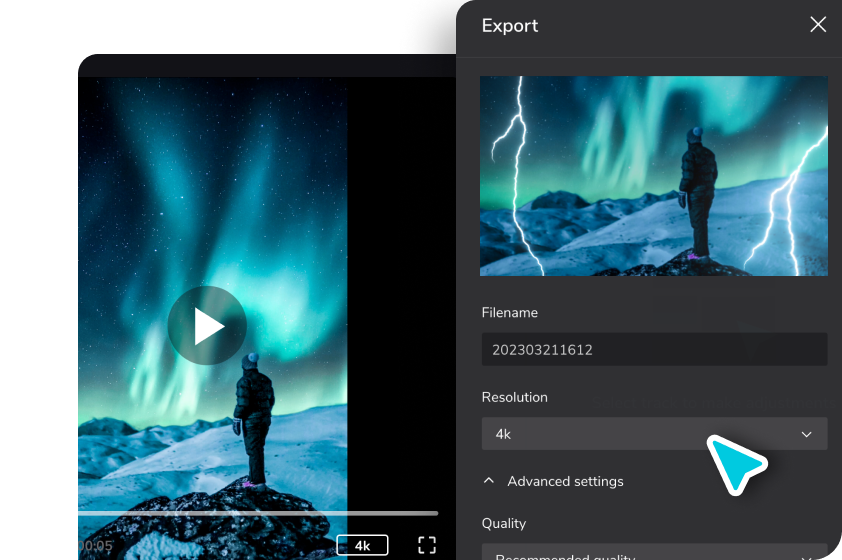
Source: CapCut

Step 1: Upload Your Video

Tap on the “Upload” button or the drag-and-drop option in CapCut to upload the video you want to add subtitles to.

Step 2: Add Subtitles

To add subtitles to your video, tap on the “Text” option located in the toolbar at the bottom of the screen. This will open a text editing panel where you can enter the desired text for your subtitles. Choose a font style, size, and color that best suits your video’s theme and readability.

Step 3: Adjust Subtitle Placement and Duration

With the text added, you can now adjust the placement of the subtitles on the video. Tap and hold the text box, then drag it to the desired position on the screen. You can also resize the text box by dragging the corners. To adjust the duration of the subtitle, tap on the text box and select the “Duration” option. Set the start and end time for the subtitle to appear and disappear in your video.

Step 4: Customize Subtitle Appearance

CapCut provides various customization options to make your subtitles visually appealing. Using the video background remover, you can add a background color or blur effect to the subtitles to make them stand out. Additionally, you can adjust the transparency, shadow, and outline settings for better readability. Experiment with different styles to find the one that suits your video best.

Step 5: Add Closed Captions

To add closed captions, which include not only the dialogue but also descriptions of sound effects and other audio cues, you can follow a similar process as adding subtitles. Tap on the “Text” option again, but this time enter the closed captions text that corresponds to the audio elements in your video. Adjust the placement, duration, and appearance of the closed captions just like you did with the subtitles.

Step 6: Preview and Fine-Tune

After adding subtitles and closed captions, it’s essential to preview your video to ensure they are accurately synchronized and appear as intended. Tap on the “Play” button to review your video and make any necessary adjustments. If you need to edit or modify any of the subtitles or closed captions, simply tap on the text box to access the editing panel.

Step 7: Export and Share

Once you are satisfied with the subtitles and closed captions, it’s time to export your video. Tap on the “Export” button located in the upper right corner of the screen. CapCut offers various export options, including different video resolutions and formats. Select the desired settings and tap on “Export” to generate the final video. Once the export is complete, you can share your video directly to social media platforms or save it to your device’s gallery.

Conclusion

Adding subtitles and closed captions to your videos using CapCut is a straightforward process that greatly enhances the accessibility and inclusivity of your content. With its user-friendly interface and powerful editing capabilities, CapCut allows you to create professional-looking videos with well-timed subtitles and closed captions. By following the step-by-step guide outlined in this article, you can easily make your videos more engaging and accessible to a wider audience. So, go ahead and unleash your creativity while ensuring that your content reaches as many viewers as possible.




Read More...

Skechers X Transformers: Rise of the Beasts collection now available for purchase

Get ready to unleash your inner Autobot or Decepticon as Skechers join forces with Hasbro to launch an electrifying collaboration: the Skechers X Transformers: Rise of the Beasts collection. Just in time for the highly anticipated release of the new Transformers: Rise of the Beasts movie, this collection offers a range of striking footwear styles, apparel, and accessories inspired by the iconic Transformers characters. So gear up and step into a world where fashion meets robotic action!

Footwear for Every Fan: Whether you’re an adult or a child, Skechers has got you covered with their incredible lineup of footwear. For adults, the athletic and comfortable Skechers Stamina V3 sneaker takes center stage. Available in five different colorways inspired by beloved characters such as Arcee, Bumblebee, Mirage, Optimus Prime, and Optimus Primal, these sneakers will make you feel like a true hero with every step.

$159

Young Transformers enthusiasts can also enjoy the collection with the kids’ range, featuring four designs of Skechers Foamies in the trendy clogs style, as well as three designs of the lifestyle footwear Skechers Stamina V2. From the playground to family outings, kids can embrace their favorite Transformers characters while enjoying the comfort and style that Skechers is renowned for.

Complete Your Transformation: The Skechers X Transformers: Rise of the Beasts collection goes beyond footwear, offering a versatile assortment of apparel and accessories to complete your transformation. The apparel collection includes an array of tops, bottoms, and jackets that capture the spirit of the Transformers universe, allowing fans to showcase their allegiance to Autobots or Decepticons in style. Complement your outfit with Transformers-themed socks, caps, and bags that add an extra touch of robotic flair to your look.

Exciting news for Transformers fans worldwide! The Skechers X Transformers: Rise of the Beasts collection is now available for purchase online until the end of June. For an immersive shopping experience, you can also find the collection in select Skechers concept stores starting from May 24, 2023. Don’t miss out on the opportunity to own a piece of this exceptional collaboration that seamlessly merges the worlds of fashion and Transformers.

With the Skechers X Transformers: Rise of the Beasts collection, you can now express your love for the Transformers franchise in a whole new way. Skechers has successfully fused comfort, style, and the iconic characters from the Transformers universe, bringing fans a remarkable range of footwear, apparel, and accessories. So, gear up, step out, and let your style transform with the power of Skechers and Transformers!


Read More...

Kids eat free at IKEA Restaurants for IKEA Family Members from 29 May – 23 Jun 23

From 29 May – 23 Jun 2023, IKEA is running a limited time promotion exclusively for IKEA Family members. During this period, customers can enjoy 1 free kid meal with the purchase of one adult meal at IKEA Restaurants with the Kids Eat Free promotion.

Choose from kids meatball, kids plant balls, or kids pasta. (U.P. $3, Now: FREE)

The Swedish furniture giant is famous for its family-friendly atmosphere, and its restaurant has a range of delicious and affordable meals that are perfect for kids. This promotion is a great way for families to enjoy a delicious and affordable meal together during the June school holidays.

Terms & Conditions

Free kid’s meal with every main dish purchased
– 1 free meal per child can be enjoyed with every 1 main purchased from the regular adult menu.
– Choice of kid’s meal are kids meatball, kids plant balls, or kids pasta. While stocks last.
– Available for dine-in only.

Read More...

Thai eatery in Jalan Besar sells $12 Creamy Crab Omelette Fried Rice with generous amount of crab meat

Nestled in a commercial office building located in Jalan Besar area, Baan Kanom Thai stands as a true gem for Thai cuisine enthusiasts. This Thai eatery offers a delightful culinary experience that transports diners straight to the bustling streets of Thailand, where tantalizing aromas and vibrant flavors await.

One of the standout dishes that deserves special mention is the Creamy Crab Omelette Fried Rice. This exquisite creation combines the richness of crab meat with the fluffy texture of an omelette and the fragrant aroma of fried rice. Every bite is a heavenly symphony of flavors that will leave you craving for more. For just $12, you get a plate of creamy omelette fried rice topped with huge chunks of sweet crab meat. You also get a special chilli dip that has a ‘zing’ to it.

Creamy Crab Omelette Fried Rice

For noodle lovers, Baan Kanom Thai also offers a delightful rendition of Pad See Ew, a stir-fried noodle dish that combines wide rice noodles, succulent meats, and fresh vegetables. The smoky aroma and savory flavors will leave you satisfied and longing for another plateful.

Seafood aficionados should not miss the Prawn Vermicelli, a dish that showcases the delicate balance of flavors that Thai cuisine is renowned for. With plump prawns, silky vermicelli noodles, and a harmonious blend of spices, this dish exemplifies the culinary mastery that Baan Kanom Thai brings to the table.

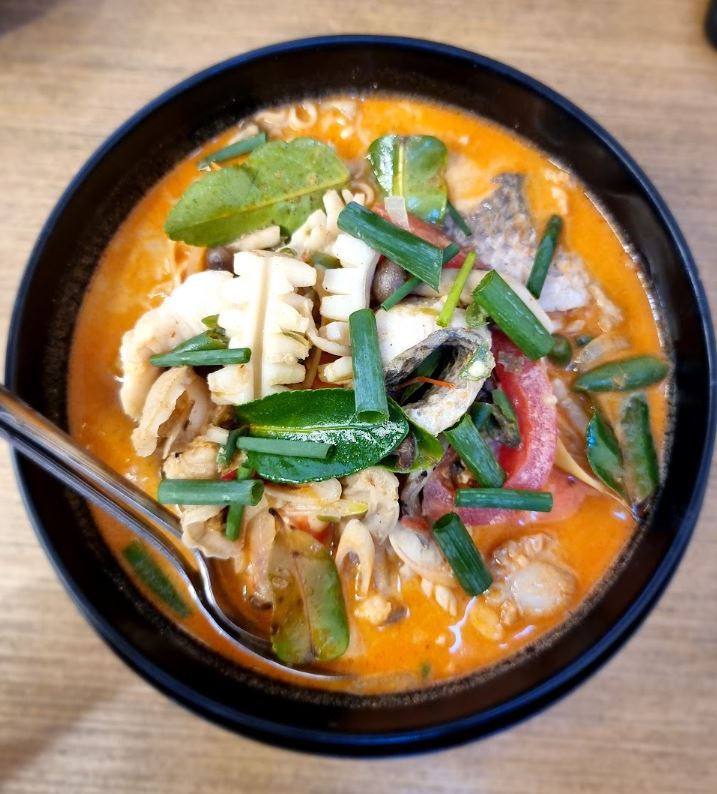
If you are a big fan of tom Tom Yum, try their Seafood Tom Yum Mama Noodles—an irresistible fusion of spicy, tangy, and savory with generous amount of scallops, prawns, fish and squid.

Seafood Tom Yum Mama Noodles

If you’re a fan of Thai street food, be sure to try the Thai Crispy Pancakes. These delectable treats are insanely chewy inside with a crisp outer shell. Whether you opt for the classic pandan flavour or venture into the realm of sweet potato or coconut, each bite is a burst of sweetness that will transport you to the vibrant food stalls of Thailand.

Thai Sweet Potato Pancakes

Thai Pandan Pancakes

You can check out their menu on their Facebook page here.

Location and Opening Hours:

📍Baan Kanom Thai
380 Jalan Besar, ARC380, #01-15
Singapore 209000
⏰ Tuesday – Sunday
Lunch: 11AM – 3PM
Dinner: 4PM – 10PM


Read More...

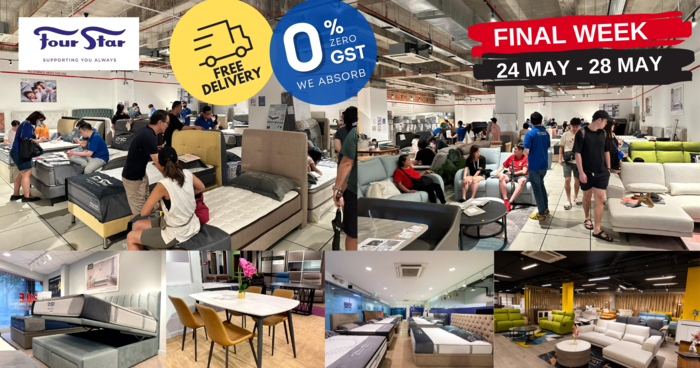
Four Star’s 55th Anniversary Sale Has Up To 55% Off Storewide For Premium Mattresses, Bed Frames, Dining Sets & More (24 – 28 May 23)

FINAL WEEK! Four Star is having 55th Anniversary Sale from 24 May to 28 May.

Get ready for an unbeatable shopping experience as Four Star, the renowned bedding and furniture specialist, presents its Storewide Stock Clearance Sale! From premium mattresses to designer bed frames, storage beds, and even European sofas, this sale offers an incredible opportunity to revamp your home with high-quality furniture at astonishingly discounted prices. With discounts of up to 55% off, prepare yourself for a shopping spree like no other!

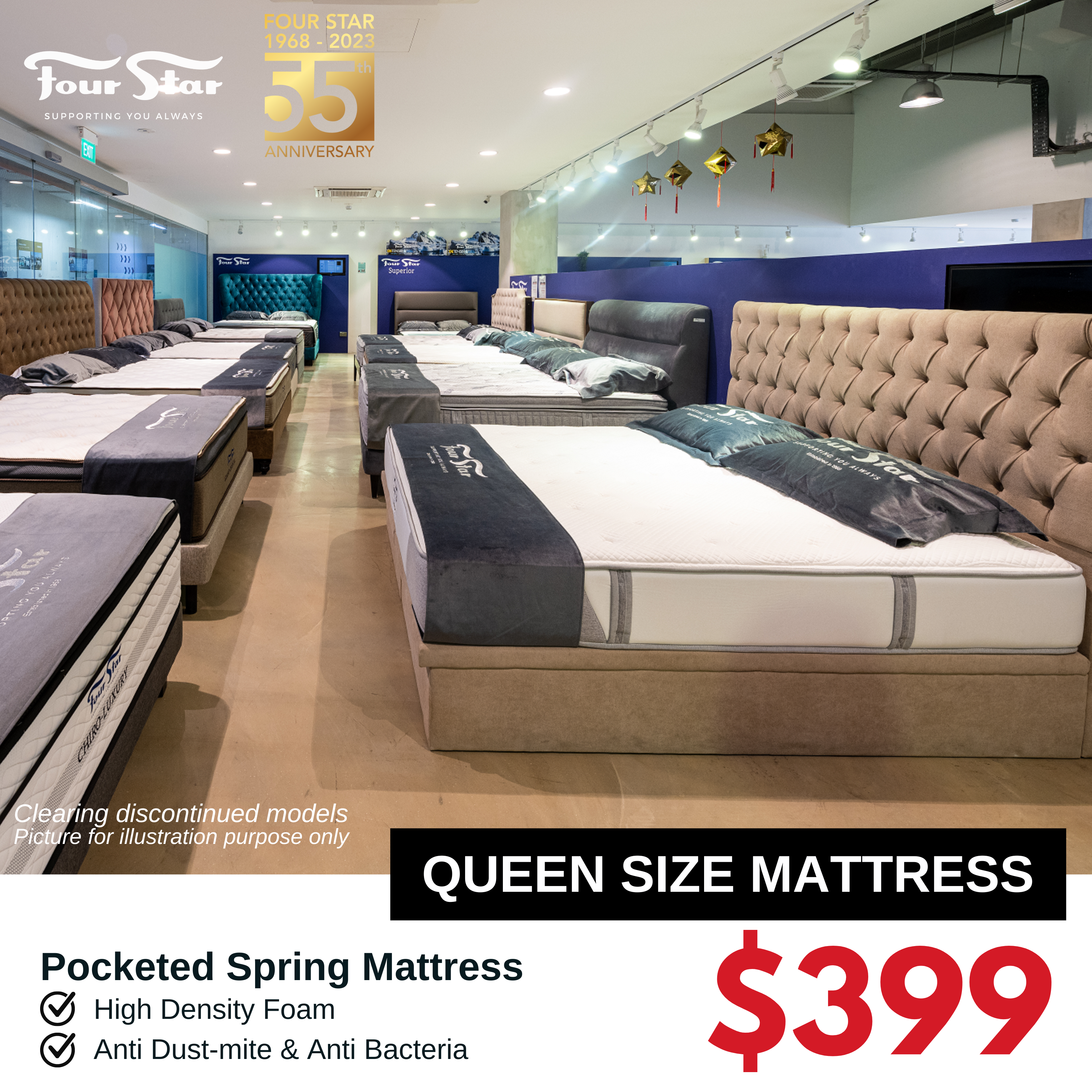
  • 🌟Premium Quality Four Star Mattresses (S/SS/Q/K) from $199
  • 🌟 Wide range of Designer bed frames, storage beds, pull out beds, etc from $199
  • 🌟Wide range of Fabric Signature Sofas $499
  • 🌟1 Seater Recliner Sofas from $299
  • 🌟Designer Leather Sofas from $699
  • 🌟High Quality Dining sets collections $399
  • 🌟Affordable custom-made wardrobes $499

Plus, enjoy more our benefits:

  • ☑️ FREE Delivery!
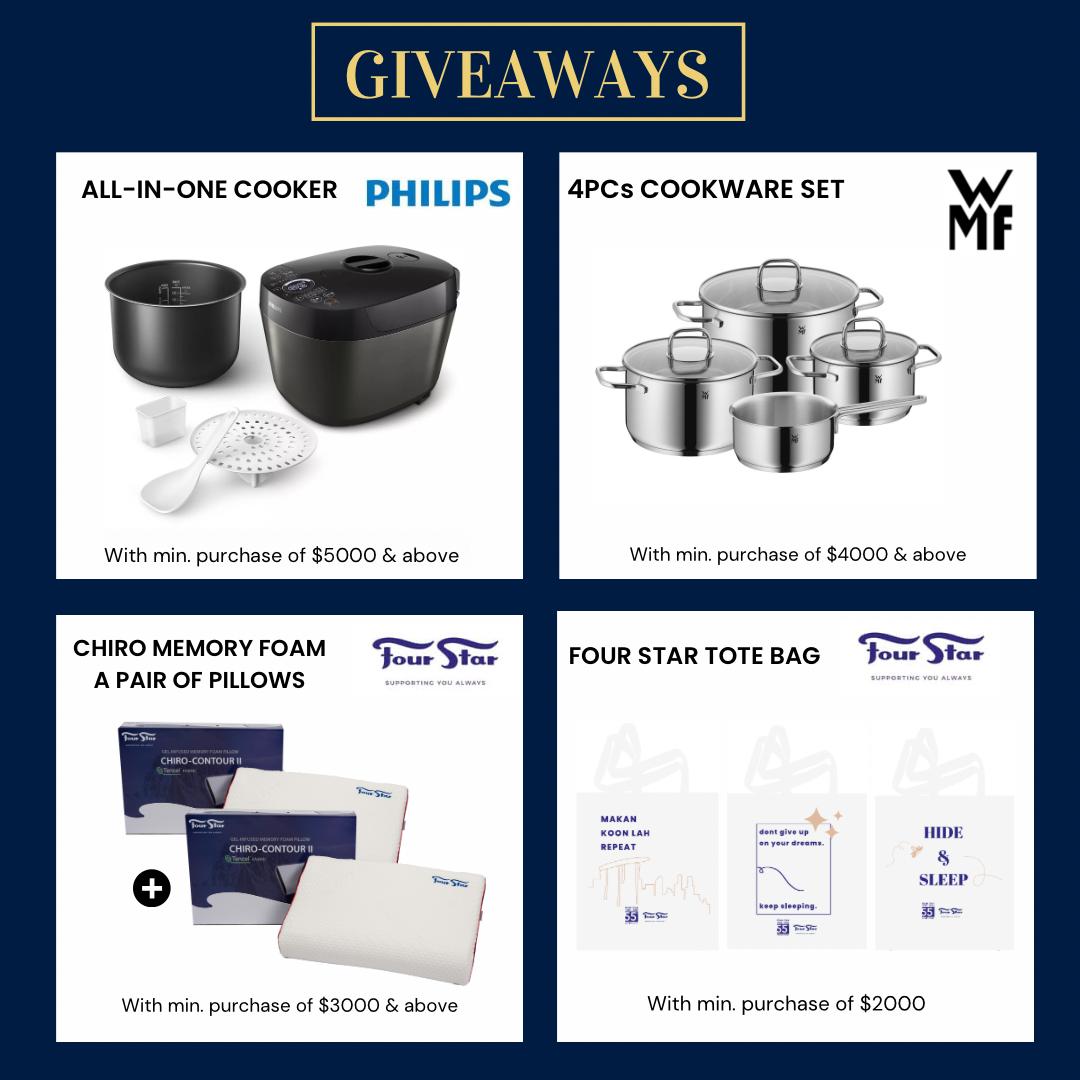
  • ☑️ FREE Gifts with purchase!
  • ☑️ FREE Taxi Claim upon checkout*
  • ☑️ FREE Parking upon checkout*
  • ☑️ All mattresses up to 15 Year Warranty!
  • ☑️ 0% Interest Instalment Plan up to 12* Months!


Celebrate Four Star’s 55th anniversary with a bang by taking advantage of their exclusive sale. Indulge in unbeatable discounts on mattresses, bed frames, and bedding accessories, and elevate your sleep experience to new heights of comfort. Whether you shop online or visit their stores, the exceptional service and expertise of the Four Star team will guide you in finding the perfect sleep solution. Don’t hesitate—act now and unlock the door to a blissful night’s sleep!

Location:

📍Flagship Store
44 Kallang Place, Level 1 & 2, Four Star Building, S339172
11am – 8pm (Daily)

📍33 UBI AVENUE, VERTEX #01-18
Singapore 408868
11am-9pm (Daily)

📍72 Eunos Avenue 7, Level 1 S409570
Mon – Fri 10:30am – 7:30pm
Sat, Sun and PH 10:30am – 8:30pm

📍Tradehub 21
18 Boon Lay way #01-95 S609966
11.30am – 8.30pm (Daily)

📍11 Woodlands Close, Woodlands 11, #01-02 S737853
11am – 8pm (Daily)

📍Hougang Mall
90 Hougang Ave 10, #04-16 S538766
Mon – Fri 11am – 9pm
Sat, Sun and PH 11:00am – 10pm

📍Hillion Mall
17 Petir Road,  #B1-02 S678278
11am – 9pm (Daily)
*Mattresses & bed frames only

📞 WhatApps/call 9234 4442 (mattress & bedframe)
WhatApps/call 9068 1287 (Sofa & other furniture)

Pictures are for illustration purposes only.
T&C Applies.

Read More...